Jun 14, 2014

The Online Game Currency ( HYPER coin)

Được đăng bởi Unknown vào lúc 12:19 PM 0 nhận xét
The Online Game Currency
www.hypercrypto.com


HYPER is an alt coin for use in online games, emerging virtual worlds, massively multiplayer online games, simulations and more.
HYPER is developing an MMO space strategy game in which players will construct an intergalactic empire that earns them HYPER (current dev team has 10+ members - more details below). As part of our game engine research, we are currently setting up and play testing a space MMO strategy game / framework on a private server. If all goes well we will be launching a space MMO strategy game much sooner than planned! Please follow the thread for more details!
Symbol coin:  HYPER


The current HYPER MMO development team has over 10 members - with artists, authors, coders, sound designers, a project manager, game mechanics specialists, science fiction freaks, visionaries and more!

HYPER multipool: https://chunkypools.com/hyper/ Mine HYPER with X11, Scrypt and SHA 256 (put those old Bitcoin miners to good use)
Special about HYPER
  • Active Dev: Very important feature of any crypto-project to succeed. The HYPER dev is, well, hyperactive! He’s pushing for good projects in this space and he has a vision related to the use of HYPER in gaming that I am sure he’ll realize soon. The crypto-space is full of talented people, after all. +1 for an active dev.
  • Community: There’s already a dedicated forum with giveaways for everyone. “I don’t like the idea of free money”, said no one, ever. The community is growing fast, and HYPER is already listed on a couple of exchanges – ShareXCoin (another very interesting crypto) and Bittrex (oh boy, that was fast!)
  • PoS: This is the in-thing, but HYPER took the right approach in having a much higher PoS than coins like Blackcoin. Giving a PoS interest of 1% to 2% per year seems completely meaningless when the price can fluctuate by 10 times that value per hour. I like the 5% monthly interest rate. The inflation isn’t going to be 5% – just look at HoboNickel if you want, with a very steady increase in money supply and no runaway inflation even at 100% PoS. Now, it gives incentive for people to hold rather than dump all their HYPER on the exchanges. Isn’t that good for the price? Yes it is.
  • Future Vision: This is nice to have, although not a necessity for an altcoin. HYPER has a vision for being included in online MMO games, and other virtual worlds. If it fails miserably, there’s nothing really to lose – HoboNickel is a successful altcoin for more than a year with no such ‘vision’ to speak of. If it succeeds, then there’s a decent amount to gain, as the price would rise based on the popularity of games using HYPER. Minimal to no downside risk here.
Investor Advice: Make strategic buys. PoS is high, so if you need money, you can always sell the stake generated instead of selling the principal. 5% monthly PoS that matures in 8 hours is pretty legit. If the price pumps up waaay above where it is now, then I’d sell and wait for the dump to buy back my stash.
Disclosure: Long HYPER, and plan on adding more to my position. May sell the stake generated.
 More infomation: https://bitcointalk.org/index.php?topic=624651.0

Mar 8, 2014

Use the coupon Hostgator

Được đăng bởi Unknown vào lúc 9:07 AM 0 nhận xét

How to use the coupon

Step1Click here to go to the official Hostgator website.
Step2: Click the “View Hosting Plans” button in the middle of the page.
Step3: Pick a hosting plan that suits your needs and click “Order Now
Step4: When you scroll down you will see a “Have a coupon code?” field. There you should enter one of the coupons mentioned above. It should look like this:
Coupon code: 
                                     Rooter2000bka                You get: $9.94 OFF
or                        Rooster2000bka                 You get: 25% OFF 
After clicking the “Validate” button, you will see the discounted price.

Hostgator Review

Hostgator has always been one of the most popular hosting sites, but it is the best web host? I have tried many web hosts and have done a lot of research. I currently have 2 hosting accounts from Hostgator and I’ve been with them for over 5 years.

Features

One of the best features about this company is that they offer quality services for a good price. Furthermore, you will get live support which can be vital for your business. I’ve been with another web host before which offered email support only. It took the tech support a week to reply and imagine now how bad that was for my business. This host also works well with content management systems like Joomla and WordPress. Take a look at the hostgator coupon code below.
Hostgator always has some promotion going on but you can save the most money if you use one of the coupon codes above.

Conclusion

This hosting company is voted #1 by this website and other review websites, as well as most users. You simply cannot find a better deal for this money. Simply use the new hostgator coupon code to get the lowest price.

Unlimited Web Hosting

Web Hosting made EASY and AFFORDABLE!

  • UNLIMITED Disk Space
  • UNLIMITED Bandwidth
  • EASY Control Panel (Try Demo)
  • 1-CLICK Script Installs
  • $100 Google AdWords Offer
  • 4,500 Free Website Templates
  • 99.9% Uptime Guarantee
  • 45 Day Money Back Guarantee
  • 24/7/365 Technical Support
View Web Hosting Plans

Reseller Hosting

Make money with your own web hosting business!

STARTING AT
/mo
96*
$19.

VPS Hosting

Get dedicated functionality without the expense!

STARTING AT
96*
$15.
First Month

Dedicated Servers

Feel the power and flexibility of a HostGator dedicated server!

STARTING AT
*
$139
First Month
Thanks for visiting! We wanted to let you know you visited one of our paid endorsers while researching your purchase.

Creating a new website?

Get started building your website in 3 easy steps:

  • Login to Weebly Website Builder
  • Select a website template & add content
  • Publish to your web hosting account

Coming from another host?

We know how difficult it can be moving to another web host.

  • Free Domain Transfer!
  • Free File Transfers!
  • Free Database Transfers!
  • Free Script Transfers!
We handle the transfer process for you! View Details
We have received many awards in our 11+ years
of providing web hosting services.
View All Awards

About HostGator Web Hosting...

Since its establishment in 2002, HostGator has been a world-leading provider of web hosting service. Although our headquarters is in Houston, Texas, we provide top-notch service to clients from over 200 countries internationally with our staff of over 750 employees. We offer SharedResellerVPS, and Dedicated server packages for both beginners and professionals alike. Each of our shared Web Hosting plans includes 24/7/365 support, a 99.9% uptime guarantee, and a 45-day money-back guarantee. If you would like to learn more, please visit our company page
*Pricing reflects 20% off first invoice

Dec 7, 2013

Repair RED BLINK , EFS CORRUPT on QUALCOM , BB OS 7.0 and 7.1

Được đăng bởi Unknown vào lúc 11:20 AM 0 nhận xét
Imei change for blackberry free

support :
- get check addres
- stuck hank logo
- erase addres manual
- repair efs (imei:0000000xxxx)
- change imei after efs repair
- type qualcom (9810,9850,9860,9900,9930)
Update
EQS Revisi
- Fix Rebuild imei still remain with 0044.xxx.xxx
- Added Magic Re-partition 4 & 8Gb
- Added cek Guid & pin

its only work on QUALCOM IC

Thank to: wawan tato
 

Dec 5, 2013

TUTORIAL READ & WRITE NV

Được đăng bởi Unknown vào lúc 4:17 PM 0 nhận xét


Tutorial READ & WRITE NV

READ & WRITE NV


Oct 26, 2013

Darcy's Blackberry Tools (DBBTool_1.5.1.0 Update Oct 19, 2013)

Được đăng bởi Unknown vào lúc 11:59 AM 0 nhận xét
Backup Manager
This lists all your current BlackBerry Link Backups.
Clicking on an item in the list will bring up information about the backup, mainly what version of OS the backup was made from.
If you downgrade OS on your phone and want to restore your newer backup to it, it won't work.

Example: if you were running OS 10.1.0.4285 and downgrade to 10.1.0.2354 you cannot restore your backup from .4285 to .2354.

However if you set the version in the backup file to any version earlier then you can attempt the restore.
Going between major versions may not work. Any backups made from 10.2 may not restore back to any 10.1 or 10.0 versions.
Clicking on the Change Version button will change the version number stored in the backup to let you try restoring it.
It will ask if you wish to make a copy of the backup first - just in case something goes wrong.


File Extraction
This performs various operations on BlackBerry files.
You can either browse for the file to operate on, or drag and drop the file anywhere in the window.
Depending on the file type you can do the following:

Autoloader - Extract App BAR files from it, dump the files directly, split the autoloader, or split out just the radio file.
Signed File - Extract App BAR files, or dump the contents if it's a full OS.
BAR File - Verify the BAR is valid, or Extract the contents.


Verifying a BAR file works by checking the checksums against the manifest.


Build Autoloader
With a copy of CAP.EXE you can build an autoloader with up to 6 signed files. Typically it's 1 or 2, either a radio file, or a radio + full OS.


DOWNLOAD

 An other Picture from: http://bbvietnam.com
[IMG]

[IMG]

[IMG]

Oct 24, 2013

BlackBerry < OS7 Security IMEI

Được đăng bởi Unknown vào lúc 1:02 PM 0 nhận xét
What so called with "RED BLINK" EFS damaged.
This caused by messed up Radio Calibration data. Simply erase this field, and viola!!,
phone is alive with DEFAULT parameter. (IMEI 044xx..)

Now, how to get Radio parameter?
You need to have "clone QCEFS" for specific phone. You can get it from a good working phone. It's Qualcomm, google your self about how to read EFS. It's spread a lot.

Write this clone data to your erased phone , and that's it! Phone is alive.
BIS running OK, Telephony functions OK. Only one thing: the IMEI is default.

This is a warning to those who have such solution.

Do you KNOW how does BlackBerry security mechanism works?

On normal way:
it uses MODEM IMEI to register to network. It's OK you can use default IMEI,
since OUR country DID NOT apply any imei restriction. But don't know next year?
 Apply IMEI policy, and this phone is DONE

UltraShell BB Tool Free

Được đăng bởi Unknown vào lúc 12:59 PM 0 nhận xét


Ultra Shell for CFP and JVL Absolute Free
----------------------------------------------------------------------------
Erase FAT
This will erase the whole content inside FAT partition.
Useful for device with built-in internal storage problem.

Erase Modem
Flash the phone before executing this command.
This will erase Modem EFS of Qualcomm Based phones.
Useful to repair "Red blink of dead" caused by damaged Modem FS.
This function will reset Modem IMEI. This function will NOT repair Modem IMEI.


Erase FS/OS/UMP
(formerly called "Nasty Erase") Useful to cleanup messed flash system on most case.
Proceed to flash the phone after this command.

Nuke
There are two command on this button. Press the splitter to choose
which Nuke command you will execute. Just Nuke or Nuke -a

Wipe
There are three command on this button. Press the splitter to choose
which Wipe command you will execute. Just Wipe, Wipe -f or Wipe -i.

Direct Execute
This is an organizer for your Rapid OS files. This is a simple launcher.
You can use FOS.exe or Rapido.exe or any Autoload.exe. Double click to config your directory.
Don't ask me to provie these files. Find discussion in forum for this.

CMD:
Even you can run CFP in command line mode easily. This is cool ;)

Disclaimer
Eventhough this tool is working as expected,
This software is provided as it is. Do all operation with your OWN RISK.
No any loss that caused by this tool should be claimed to me.
Link: UltraShell BB Tool Free

<<< For Educational Purpose >>>
Ambarawa Kota Palagan. Indonesia - 2013

Oct 16, 2013

Cute Smart Sexy Fancy Pink HD Doodle Theme -SMS Viewer And Composer

Được đăng bởi Unknown vào lúc 7:45 AM 0 nhận xét
A cute viewer and composer for your SMS both for Girls and Boys. 
 
[IMG]
 Customize the looks of your SMS with A cute viewer and composer for your SMS handsome effects:   
+ Textures  
+ Backgrounds 
 + Colored Bubbles  
+ Colored Texts  
+ Themes Cursive, bold, italic and 100+ fonts! 

This SMS viewer has five superb themes:-

 1) Doodle Chalkboard Theme 
2) Yellow Beauty Theme 
3) Monster Doodle Theme 
4) Doodle Wooden Theme 
5) Pink Doodle Sky Theme  
 
 Cute viewer and composer for your SMS Features:- 
 
*View SMS with  five sexy themes
*Change the SMS background with the photo of your loved ones. 
*Change the colors for incoming and outgoing SMS bubble.
* Create awesome texy  messages fast and easy!  
* Decorate your messages with lots of color, beauty and special effects. 
* You can even set the photo of your loved ones as the SMS background. 
* View and compose your SMS with Colors, Smileys and formatted web Links!
Link: Appworld
Link: Download 

Phone Performance Optimizer

Được đăng bởi Unknown vào lúc 7:36 AM 0 nhận xét
Phone Performance Optimizer allows you to recover the
 lost/used up memory from the device making your applications
 run faster and smoother. The app will optimize device 
performance by reclaiming unused memory periodically.

Also,it rechecks the reasons for battery drain periodically
 like - WiFi could be switched on when you are no where near
 WiFi, apps running in background, GPS draining your battery
 when you are no longer using it and so on. Phone Performance
 Optimizer makes appropriate choices for your BlackBerry and 
saves its battery from draining. 

Features of Boost Phone Performance:

   - Option to Optimize Memory now.
   - Option to set an Auto Scheduler.
   - Works silently in the background.
   - It automatically tries to recover lost memory.
   - Free memory can be assigned to running applications so that your 
Device runs faster.
   - Monitors Radio signals in low signal areas to switch them off.
   - Monitors GPS usage running on, when it is no longer used.
   - Monitors apps running in backgrounds.
   - Monitors WiFi in area of no wifi signal and saves battery.
   - Gives alerts when Battery drains.

Hurry up....what are you waiting for? Install Phone Performance Optimizer instantly
 If you face any issues or have any feature suggestions, write to us 
at support@kumilabs.com
lINK: Apworld 
Link Phone Performance Optimizer

Oct 4, 2013

e-Mobile Today Professional v6.39

Được đăng bởi Unknown vào lúc 12:09 PM 0 nhận xét
e-Mobile Today Professional v6.39 - The most powerful personal information manager on the market contacts, tasks, appointment, email ... Take user experience to the next level. Revolutionize BlackBerry® Today!


e-Mobile Today Professional for BlackBerry

Take your BlackBerry® user experience to the next level!

VIEWS:
* Easily switch between Today View, Icon view or Carousel View by pressing button on the side of phone

MISSED CALLS:
* At-a-glace view of missed calls of today and past several days
* Make call directly by pressing the highlighted numbers.
* Send text message, dismiss calls with single click

CONTACTS:
* All your contacts at a glance without leaving front screen.
* Make calls, send emails and text messages with a single press.
* Easily search for contacts or set appointments with contacts.

DATE & TIME:
* Choose btween Analog or Digital display
* Supports 12/24 hr format.

APPOINTMENTS:
* Powerful appointment manager. View today s and upcoming agenda from today screen.
* View appointments by DAY, WEEK or MONTH.
* View any appointments by a given date.

TASKS:
* View today s tasks, upcoming, past due or tasks with no due dates all from one place.
* Mark task completion with one key press.
* Option to hide completed tasks.

EMAIL:
* Get instant email notification on your screen.
* View unread emails by senders and subjects.
* Read email details with a single click.
* Delete multiple emails.
* Easily create meeting request by adding email to calendar.

PERSONALIZATION:
* Choose different themes that fit your mood.
* Choose your own font size and color.
* Choose what goes on the screen and at what order.
* Support simultaneously opening multiple plug-ins on screen


e-Mobile Today Professional v6.39

e-Mobile Today Professional v6.39 for BlackBerry


Version: 6.39
File Size: 2 MB
Required: 5.0.0 or higher
BlackBerry World
http://appworld.blackberry.com/webstore/content/5124/

Rock File Manager v1.0.1

Được đăng bởi Unknown vào lúc 12:08 PM 0 nhận xét
Rock File Manager v1.0.1 - Rock File Manager, really cool and powerful tool allows you to manage your documents, photos, music and every kind of files happily, with zip & rar compress and decompress function, quick search function, COD install function, favorites and even more!


Rock File Manager

• File management, copy, move, change file attributes and more.
• Extract part or full zip & rar archive to target folder.
• Compress files into an archive.
• Quick search and highlight result, search files has never been so cool.
One click to install COD files.
• Favorites, add your favorite files to favorites for a quick visit.

Changelog v1.0.1:
-Fix a file cut/copy/paste issue.

Rock File Manager v1.0.1

Rock File Manager v1.0.1 for BlackBerry

Version: 1.0.1
File Size: 284 KB
Required: 5.0.0 or higher
 *)Note:
FOR OS 5.0
Open Options - Applications - Choose App Rock File Manager - Edit Permisions - Connection - Press BlackBerry Keyboard - Expand - Internet and Wifi set to Deny - Restart and Done ^^

FOR OS 6.0 - 7.1
Open Options - Device - Application Management and Choose Rock File Manager - Edit Permisions - Connection - Press BlackBerry Keyboard - Expand - Internet and Wifi set to Deny - Restart and Done ^^

BlackBerry World
https://appworld.blackberry.com/webstore/content/64300/

CP BlackBerry Tool

Được đăng bởi Unknown vào lúc 12:02 PM 0 nhận xét


Cp Blackberry Tools by Kang Arye

Fitur Blackberry tools :
-Device info (pin ,imei ,os ,swap partlist .etc)
-Flashing Path via rimfolder (sfi and java)
-Auto Loader(rapido,Factory Os ,reset lcd,reset buyr)
-Auto Applikasi,Load Cod/Jad File
-Load bahasa Indonesia
-Wipe,nuke,resetfactory,erase all
-Unlock Mep by Siroya
-usbMs Info,Enable,Disabled
-Info cfp and Javaloader
-Write Sfi and app
-Write mfi

Link: http://www.mediafire.com/?5orgb29gzr9bxrq

Sep 18, 2013

NUBLINK FX PREMIUM 2013 by Timothy Gunawan

Được đăng bởi Unknown vào lúc 8:50 AM 0 nhận xét
"NUBLINK FX PREMIUM 2013"
Improved with the new component CFP V 4.2.0.13

When the bbsak, vnbbutils, bmcp, BB boss, p*tool, s***pro, Z**key, Mr.**l, Jlcommander cannot handle your job!!

BlackBerry solution for blinking red light 100% working With "NUBLINK FX PREMIUM"

Blinking red light solution for all BlackBerry

Symtom:
When you receive a new message, your BlackBerry flashes a red light as an alert. If the light does not stop after retrieving the message, it could be the result of several factors including the need to charge your phone or an issue with the device.

New and tried on 100s off bb modules success on all

• How to do?
1. download NUBLINK FX PREMIUM

2. Open the folder autorun & Double click autorun icon to start the program.

• Description of the feature:

- Wipe installer partition
specifies that only the installer partition should be removed.

- Wipe file system
specifies that only the filesystem should be wiped.

- Wipe file system & OS
the filesystem and OS regions of flash to be irreversibly erased

- Extreme wipe
this will erase all the data & make your bb go zero

- Nuke
erases all of the user's data off the device
including the filesystem and the password. This command is useful if a
password is lost and one would like to make the device usable again at the expense of lost data.

- Factory Reset
This will reset IT policy to factory settings
(Wipes all user data)

- BB Info
This will display information about system,OS,App,address of
your BB device in hexadecimal format

-Flash Info
displaying info about your ICflash

-Load SFI, NAL, Full OS
this will load SFI, NAL, Full OS in to your device.

Note: for this action you must put this file (SFI, NAL, Full OS) in the directory folder X
and renamed each file with:
1. rim*****.sfi > os.sfi
2. nal file > nal.exe
3. rapido / PRD > os_installer.exe
*for SFI file you can find in the directory for SFI file you can find in the directory C:\Program Files\Common Files\Research In Motion\Shared\Loader Files\***your OS***\UMTS\rim*****.sfi

- One click auto complete
this will take some time, as we will now first WIPE your device 2 times, next NUKE it, then load NAL file, continue with load SFI, , and finally load full OS into your device in one click

Note: for this action you must put this file (SFI, NAL, Full OS) in the directory folder X
and renamed each file with:
1. rim*****.sfi > os.sfi
2. nal file > nal.exe
3. rapido / PRD > os_installer.exe
*for SFI file you can find in the directory for SFI file you can find in the directory C:\Program Files\Common Files\Research In Motion\Shared\Loader Files\***your OS***\UMTS\rim*****.sfi

-Vendel
One click delete VENDOR.XML

-IP Reseter & Renewer
some hosting site not allowed you to download file 2 times or over, that's because the server has detect your IP already use for downloading and blocked your ip, now you can use this utilities to reset and renewing your ip and back to download with the same site without detected by the server

*and some additional tools that are already familiar to you that you do not describe

Advanced user only !

~Don't connect your normal BB to pc if the step 2-4 is open, this command will erase all your normal BB data inside!!!


Here: NUBLINK FX PREMIUM

Aug 26, 2013

DBb tools v:10

Được đăng bởi Unknown vào lúc 8:08 AM 0 nhận xét


2013-06-03 - blackberry tools by:darmiles Many More Added
What's New
- Added Support
NEW MEP SUPPORTED
MEP-04598-006
MEP-09625-003
MEP-12599-004
MEP-12907-003
MEP-17568-004
MEP-24660-002
MEP-26490-001
MEP-26900-001
MEP-27501-002
MEP-27559-001
MEP-27561-001
MEP-29080-001
MEP-40488-001
MEP-46976-001
MEP-09292-007
MEP-27501-001
MEP-14896-006
MEP-11534-010
MEP-40488-004
MEP-11534-009


1 READ THIS FIRST
2 Dual WIPE my device only
3 NUKE my device only
4 Load OS SFI only (This loads OS not COD files)
5 Load NAL only (No application linked)
6 Load Full OS only
7 This will WIPE, NUKE, NAL and Load SFI AND full OS in 1 click

V:10b


Darmiles Blackberry1.exe

%%%%%%%%%%%%%%%%%%%%%%%%%%%%%%%%%%%%

PATCH UPDATES FOUND
*Added new MEPS
*Minor bugs Fix


PATCH UPDATE CLICK ME

Jul 18, 2013

Advance OS and LED Pro v16.3.1

Được đăng bởi Unknown vào lúc 3:26 PM 0 nhận xét
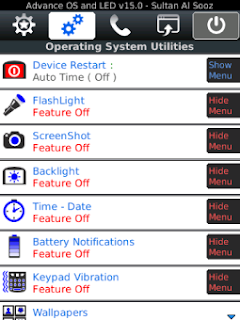
Advance OS and LED Pro 16.3.1 - 20+ Apps in 1 App (The most powerful utility app made for BlackBerry®)


Advance OS and LED Pro

**One time purchase and upgrades are free
* Know if it is a BBM™, SMS, Email or a Call by making upto 4 different Ringtones & LEDs PER Contact.
* Read your messages (BBM™,Email,SMS) without opening any app or even touching your phone.
* Repeat audible reminders alerts for BBM™,Email,SMS,Missed Calls.
* Make custom LEDs for battery, network, Wifi, Bluetooth and all apps Notifications.
* Restart or schedule a phone restart without battery pull.
* Battery & usage monitor feature (full statistics on all your chat, calls, device and battery usage).
* AutoText (Word Substitution) Manager, export /import, share and edit on PC.
* Backup, restore & email all contacts (with photos), export to (Excel,Outlook,Gmail), find/Merge duplicate contacts and Move all contacts to default list or manage multiple contact lists.
* Instant shortcuts launcher to start apps, open websites, call friends, automate your actions, display date, time, battery and wifi status from any screen.
* Download all email attachments automatically.
* Take screenshots with no watermarks.
* Use camera, LED or screen light as flashLights with no time limits.
* Control screen backlight to keep screen on for as long as you want.
* Provides a sound for your battery and network status (makes sound when you start, stop charging or full battery).
* Show Time and Date in every menu.
* Wallpaper changer will change your homescreen background (wallpaper) every time you look at your screen.
* Set phone call duration/timer vibration reminders while in a call.
* Prompt for call redial, call dial confirmation and save unknown numbers after phone calls.
* Lock call screen while in call and display full screen contact pictures.
* Set call loud speaker and vibrate on call connect, mute, hold and more.
* Vibrate when pressing virtual or physical keypad in all apps.

--- BBM Features ---
- Read BBM messages without your friends seeing 'R's.
- Assign an LED light and a ringtone for Each BBM contact.
- Auto delete your chat history.

--- LED Features ---
- Caller LED ID Unlimited
- Effects: Fade/mix or blink LED light colors.
- Color Picker: More than 100 colors and shades available using a color picker, up to 4 colors per contact or app and 14 effects per color.
- Multi-Colors: create your own disco lights up to 12 colors per 1 Multi-Color.
- Night LED Profile: Schedule Turn Off LED lights at night.
- LED Contact Groups.

--- Popup Feature ---
- Popups can mark as read/ delete/ call/ Launch app/ reply/ forward and so much more.
- Popups can wake up phone screen from standby.

--- Additional App Features ---
- Backup / restore all settings with option to send as an email attachment.
- Is EXTREMELY small in SIZE, with very small BATTERY & memory utilization, COMPARE.

ChangeLog version 16.3.1:
- Fixed a major problem that prevented the app from adding more apps ti the LED and Ringtone Feature.


Advance OS and LED Pro v16.3.1 BlackBerry

Advance OS and LED Pro v16.3.1


Version: 16.3.1
File Size: 346 KB
Required: 5.0.0 or higher

Download Advance OS and LED Pro v16.3.1: Offline
BlackBerry World
https://appworld.blackberry.com/webstore/content/18560228/


Buy me a Coffee


AddOnis: The Ultimate BlackBerry Configuration App

Được đăng bởi Unknown vào lúc 3:13 PM 0 nhận xét
AddOnis is a cool app from Twinkler that they call The Super Utility for BlackBerry. The app has an incredibly long feature set, so I’ll put it after the break for you to read through. Suffice it to say, this app gives you a lot more options and features that would normally be spread across several smaller apps. With AddOnis, you can block or permit calls from certain numbers, add options to various alerts, add a configurable missed call indicator, provide In-Call notifications and more.
Twinkler let us know that they have lowered the price of AddOnis to $6.99

Features include:
  • New LED Reset option in AddOnis Phone Menu!
  • New Firewall Engine! The Firewall now works even faster!
  • New “Addressbook Only” Firewall mode.
  • New “Auto WiFi Power Off”, if WiFi is out of coverage, it will automatically be turned off to conserve precious battery power.
  • New “Emoticons” (uninstall & reinstall if you have a prior version)
  • New “Tone Notification” in InCall Notification options.
  • Vibrate on call connect/disconnect, the vibration duration is configurable.
  • Vibrate when ringing on incoming calls (in profiles, phone needs to be set to Ring ).
  • Choice of vibration type,user can choose Pulse or Constant.
  • After hang-up, the user is prompted to add new number to Addressbook or to update existing contact.
  • Log incoming calls and outgoing calls to the Calendar, user can select different calendars and choose to log these events as private.
  • In-Call notification at user defined periods during calls, the notification type can be set to Vibrate, and the vibration duration or tone volume are both configurable.
  • Call Firewall with two working rules, Block Blacklist and Permit Whitelist.
  • Call Firewall has two action modes, Hang-up and pickup and Hang-up . Each number added to Call Firewall can have its own action mode, or use the system default.
  • Call Firewall can be configured to work in Fuzzy-Match mode (Prefix Blocking Mode).
  • Call Firewall can block Private and Unknown Numbers.
  • Blocked Call Log shows complete list of rejected calls.
  • Call Firewall can be configures to block outgoing calls to numbers in the Blacklist.
  • Support for Autolock or Autostandby modes.
  • Autolock / Autostandby feature allows user configure the idle timeout before Device Locks or enters Autostandby.
  • Configurable options to disable Autolock /Autostandby when connected to USB or on a call.
  • Autolock /Autostandby can be automatically disabled by a user defined program list so that when a specific program is running in the foreground the feature is disabled.
  • Configurable to Autolock / Autostandby device only when device homescreen is displayed.
  • SMS Signature, allows adding SMS signature automatically when sending SMS (only supported in BerryAddon for OS4.6).
  • Insert Emoticons into SMS/MMS/Email/PIN Message, these Emoticons can be easily customized.
  • Send call log to Addressbook to create new contact or update existing contact.
  • Allow user to choose Addressbook field to insert number into when adding new number or updating existing contact from number in Call Log (Home, Work, etc.)
  • Send Call Log to Calendar to create event.
  • Send Call Log to Tasks to create task.
  • Send Call Log to Memopad to create memo
  • Send Call Log to number lookup engine to reverse search number information.
  • Send SMS/Email/PIN Messages to Addressbook to create new contact or update existing contact.
  • Send SMS/Email/PIN Messages to Calendar to create event.
  • Send SMS/Email/PIN Messages to Tasks to create a new task.
  • Send SMS/Email/PIN Messages to Memopad to create a new memo.
  • Send event to Tasks to create task.
  • Send task to Calendar to create event.
  • Open UTF8 format text documents in Memopad, and send memo to Calendar/Task/SMS/Email.
  • Send Contact to Call Firewall Blacklist/Whitelist.
  • Insert contact information into SMS/MMS/Email/PIN Message. (Does not support beta version of OS 5.0)
  • I think í best for OS 4.5, OS5 and above not perfect.
  • Link to download. 
  •   OS 4.5 +
  •  OS 4.6+ 
  •  OS 5
  • If you like this app, contact me with Pin.

Buy me a Coffee


Jul 17, 2013

BeBuzz - LED Lights for Apps and Contacts - SALE

Được đăng bởi Unknown vào lúc 4:58 PM 0 nhận xét
Take full control of your BlackBerry® front notification LED! 
Green for calls from your boss, pink for e-mails from your girlfriend, 
blue for BBM messages from your kids and "fast disco" for all your 
Twitter messages.

BeBuzz is the most feature packed and user friendly LED notifier app. 
Only BeBuzz adds unique features like Repeating Audible Notifiers,
 On-Screen Popup Notifiers, Text-to-Speech, V
ibrate-While-Ringing and e-mail notifications.

And only BeBuzz allows you to add BBM contacts by simply selecting
 from your BBM contact list. No complicated linking to your address
 book needed!

With more than 35 Million downloads and multiple awards BeBuzz is
 one of the most popular apps for BlackBerry smartphones ever!

*** Featured on the official InsideBlackBerry blog as an AppWorld
 success story ***
*** Voted #1 BlackBerry App Developer of the Year 2010 by CrackBerry! ***
*** Nominated for the CrackBerry App Award 2010 "Best Utility 
- OS enhancement" ***

*** 1st app ever to bring customizable LED colors to BlackBerry ***
*** 1st to bring support for LED colors for 3rd party apps ***
*** 1st to bring disco LED colors ***
*** 1st to bring support for LED colors for individual BBM contacts ***
*** 1st to bring unobtrusive "toast" notification popups ***

NOTE: If you have trouble reinstalling the app or are receiving the wrong 
version from App World you can download from http://www.bellshare.com/bebuzz 
and recover your license key from http://www.bellshare.com/activationsupport

FEATURES:

- *NEW* E-mail, text and BBM filters. Create notifications for specific 
messages filtered by message sender, subject, body etc. Automatically 
perform actions on filtered e-mail messages (Delete, mark as read,
change priority)

- *NEW* Use toasts or fully interactive popups for e-mails and text messages.
 Reply, forward mark as read e-mails and texts straight from the popup. 
Popups are fully customizable (Display, font, buttons etc)

- *NEW* E-mail notifications. Missing notifications while your phone is in the other 
room? Get an e-mail on your desktop PC when your phone's battery is empty,
 phone is fully charged, when you get a new BBM or any other notification supported by BeBuzz.

- Choose from 20 predefined solid LED and 12 rapid flashing DISCO LED COLORS

- Assign colors for E-Mails, SMS, BBM and Calls from your FAVORITE CONTACTS,
 see who it is that is contacting you

- This FULL version gives you UNLIMITED CONTACTS

- Assign colors for BlackBerry Messenger, Facebook, Twitter, 
Missed Calls, Calendar, Tasks, Battery and many 3rd party apps (see list below)

- Create an unlimited number of CUSTOM LED COLORS and DISCOS

- STACK 2 LED COLORS for even more color variations

- Repeating Notifiers: Keep your phone's audible notifiers repeating until you acknowledge them

- On-Screen Popup Notifiers: Unobtrusive on-screen messages ("toasts") for messages and events

- Text-to-Speech: BeBuzz will read your messages out aloud, even BBM messages!

- Vibrate-While-Ringing: Have vibrate while ringing for notifiers and incoming calls.

- Vibrate/sound on call connect/disconnect

- Fully customizable and doesn't drain your battery!

* Supported 3rd party apps:
Visual Voicemail, Gmail, crunchSMS, AIM, BBM, BeejiveIM, Cnectd, eBuddy XMS, Chat for Facebook Pro,
 Chat for Facebook Pro, ICQ, GoogleTalk, GroupMe, Hookt, instango, IM+, IM+ Lite, Kik, LiveProfile,
 Nimbuzz, pMessenger, Skype, Trillian, Touch, WhatsApp, MSN, Yahoo, Badoo, Facebook,
 Facebook Messenger, myspace, myKite, KakaoTalk, Blaq, HootSuite, OpenBeak, SocialScope, TweetGenius
, Tweetissimo, Issimo, Twitter, UberTwitter, UberSocial, Calendar Pro, Pocket Informant, BeWeather,
 BlackBerry News, BerryReview Mobile, BlackBerry Travel, BeReader, AP Mobile, ToDoMatrix, ebay, 
Google Voice, MeterBerry, n-tv, ScoreMobile, Soti Pocket Controller Pro, TheBirthdayApp, Viigo, 
YouMail, Pingchat, Improved Chat for Facebook 
 Link: BeBuzz - LED Lights for Apps and Contacts - SALE

Buy me a Coffee


Battery Life Tips & Tricks

Được đăng bởi Unknown vào lúc 9:22 AM 0 nhận xét

Battery Care & Feeding

  • A new battery should be charged fully, then depleted to red-line. Repeat for 2-3 cycles to condition the battery.
  • Charge the phone nightly. Frequent top-offs are better for a LiIon battery than deep discharges. Consider a charging pod.
  • Set the clock option for When Charging: Enter Bedside Mode. This dims the outer screen and turns off LED notifications.
  • Once in a great while, red-line the battery. This recalibrates the battery meter.
  • The Options screen has a more accurate reading than the battery meter. Settings->Options->Status.


Hardware Tips
  • Turn off the Wi-Fi (8220) and/or Bluetooth radios when you aren't using them. Go to Manage Connections.
    [Edit 2011.04.20: Use SmartWiFi to automatically turn Wi-Fi on/off based on cell tower.]
  • Turn off the GPS (8230) radio when you aren't using it. Settings->Options->Advanced Options->GPS->GPS Services: Location OFF.
  • Use a BlackBerry-branded Flip holster, which has a magnet to trip the in-holster sensor and put the phone in standby mode.
  • Use a USB cable for modem tethering instead of a Bluetooth connection. Bluetooth tethering uses a lot of power.


Configuration Tips
  • Use UMA (8220) in weak signal areas if possible. Maintaining cell service in a dead zone obviously draws a lot of power.
  • Turn off network coverage indicator (green LED). Settings->Options->Screen/Keyboard->LED Coverage Indicator.
  • Turn off Bluetooth connection indicator (blue LED). Settings->Options->Bluetooth, click Menu key, choose Options->LED Connection Indicator.
  • Set screen brightness as low as tolerable. Settings->Options->Screen/Keyboard->Backlight Brightness.
  • Set backlight timeout as low as tolerable. Settings->Options->Screen/Keyboard->Backlight Timeout.
  • Set backlight auto-dim to On. Settings->Options->Screen/Keyboard->Automatically Dim Backlight.
  • Set profiles to use Tone instead of Vibrate or Vibrate+Tone.


Application Tips
  • Update your BlackBerry to the latest firmware. Newer firmware often incorporates battery-saving tweaks.
  • Always exit applications using Menu->Exit or Menu->Close. Forgotten applications running in the background will leech your battery. While holding down the Alt key, press Escape then scroll left/right to see the running applications.
  • BerryWeather: set updates as infrequent as tolerable. Menu->Settings, "Auto Update" and "Advisory Auto Update".
  • E*Trade Mobile Pro: disable streaming quotes
  • Slacker: cache stations on your microSD card instead of streaming them OTA.
  • WeatherBug: set updates as infrequent as tolerable. Settings->Options->WeatherBug Settings, Menu->Advanced Settings  
Buy me a Coffee

Z10 Tips, Tricks and Shortcuts

Được đăng bởi Unknown vào lúc 9:19 AM 0 nhận xét
Tips using the Z10 BlackBerry.

  • For the new Z10 user, you'll find some good stuff here and I urge you to just sit down for 20 miutes and go through each of these. They'll stick with you that way.
  • For the experienced user, please feel free to post your own tips in this thread! I'd ask that we stay on topic, and let's get as many as possible posted here.
 Settings
  1. First, find your SETTINGS easily by swiping down from the top bezel. There you will see Settings, Bluetooth, Alarm, Rotation Lock, WiFi and Notifications. In your Settings, you will find your About screen, Network Connections such as your mobile network, Mobile Hotspot, NFC, Airplane Mode, etc.; your email accounts setup, Language and Input, BlackBerry Protect, and many other key settings.
  2. Name your Z10 at Settings > About > Device Name. This is the name of the device a WiFi router will see, when using the BlackBerry Link on your desktop, or when sharing media files.
  3. Remember the Overflow icon, which is noted by the  icon (three horizontal dots) This icon is often seen in the Hub, at the bottom of email compose screens and in many core BB10 apps and will lead you to more settings, options or actions for that screen.
  4. Take a screen shot of your Z10 screen by pressing both the UP and DOWN volumes keys simultaneously. The screen shot is saved in your Pictures folder.
  5. Stop the red LED quickly by tapping the top edge Standby button. Sometimes I don't have time to even peek at the Hub, and a quick tap of the standby button let's me get back to work for a few more minutes.
  6. Hub Quick Controls: While in your Hub view, tap the overflow icon ⁞ and then Settings > to find your settings for Hub Display and Actions (change the sort order of messages, download images automatically and more), Hub Management (you can enable and disable which email accounts, Facebook, and Twitter to appear or no in the Hub.
  7. Application settings can often be found by swiping down from the top bezel to find more Settings, Help, or About that third party application.
  8. Disable the Delete Message Confirmation from your Hub screen > tap the overflow icon ⁞ > Settings > Display and Actions > scroll down to and disable the Delete Message Confirmation.
  9. Peek when busy! If your actively in an email or other app like Twitter, you can use one finger swiping slowly up from the bottom bezel to view any mail, BBM or Hub notifications on the left or right of the pane. Keep your finger on the app and swipe back down to continue in the active app, or let go to move to another app. Swiping up from the bottom and over to the right all in one action hides that active app and takes you directly to your Hub.
  10. Check your battery percentage at Settings > About > change the top Category from General to Hardware and the battery percentage is at the bottom of the screen. I've downloaded "Battery Watch" from BlackBerry World for free, as an icon on my screen.
  11. Speed Dial settings are found by opening your Phone application and while in the Call List or Contacts view, touch and hold the desire contact to add to your Speed Dial and on the popup side bar, touch the Star icon (Add to Speed Dial).
Typing/Keyboard
  1. Word Substitution on your Z10 works beautifully! Find it in your Settings > Language and Input > Automated Assistance > Word Substitution. We formerly called this AutoText, and it works all the same as before. There are a few pre-loaded, and I make my own, for things such as creating an entry of "hh" which becomes "Headed Home" I often use to let family know I've left the office at the end of the day. You can create Twitter hashtags, such as "bbt" becomes "#BlackBerry10", "myadd" instantly enters my physical office address. Learn to use the pre-loaded entries such as "ld" for today's date, "lt" for the current time, "mypin" to enter your Z10 PIN, or "myver" to instantly enter your BlackBerry model and OS version installed.
  2. Hide the keyboard on any screen by wiping down with two fingers on the keyboard. Now you can see more of the long BBMessenger chat.
  3. Format your Email to add colored fonts, Bold, bullets, or numbering... While in the email compose screen, swipe two fingers down to hide the keyboard and you'll see the Attach, Format, Importance and the overflow [⁞] icon... which allows you do BCC: a contact in the email.
  4. Minize the keyboard quickly by touching the space key for two seconds, or by using two fingers to swipe downward on the keyboard.
  5. Switch Keyboards quickly between the QWERTY keyboard and the numeric/symbol keyboard by swiping down on the keyboard with one finger.
  6. Delete whole words by swiping left across the keyboard. Delete two words by swiping leftward with two fingers, three words with three fingers.
  7. Select a word by touching and holding the word, the blue selection box will surround the word. Hold that word a second longer and the entire sentence will be selected. Another second, the entire paragraph will select; a second longer and the next paragraph will select with it, and so on.
Media
  1. Use the Camera on the Lock Screen by touching the camera icon for five seconds... instant camera for the quick shots without unlocking!
  2. Camera Tips: Use the up or down volume to activate the shutter, or simply touch the screen. Touch the Overflow icon for the camera's Burst mode (touch and hold for sports shots!) or to change the front-facing camera, or the Stabilization mode for shaky hands. The up/down volume keys also stop and start the video camera.
  3. Set your Music Controls to your volume keys by going to your Settings > System Volume > to set the Music Shortcuts to On. Now your device volume up/down keys can be pressed to take you to the next or previous track in your music library.
Calendar
  1. Switch calendar views quickly between the single day view to the week view, tap the screen twice quickly
  2. A six month calendar is viewable, from the month view, by dragging down from top blue month title. From there you can swipe left or right to the previous or future six months, and touch a month to view that month.
Miscellaneous
  1. Customize your icon layout by touching and holding an icon for two seconds until they pulsate... Touch and drag an icon within the current screen and let go to place it; drag an icon across the edge right or left to another panel, or drag one icon onto another to create a new folder with both icons located in that folder (you'll have a New Folder box pop up where you can name the folder). Rename a folder by touching it a few seconds.
  2. Voice Control can quickly access from any screen by pressing the side MUTE key for two seconds (this is the button between the up and down volume keys).
  3. Just Type! I am amazed at the ease of typing and self-correction of my typing mistakes on the Z10. I just seem to enter gibberish and the Z10 makes sense of it all in 99% of the words. Take time the first two weeks to use the word flick as you type and the Z10 will learn even better your typing and writing habits.
  4. Just Speak! I have never been a big user of my former BlackBerry voice to text apps or services. They just never worked right for me. But WOW, this Z10 is actually getting better and better each time I use the Voice Control. Just like typing, it's learning my speech pattern, southern accent and idiosyncrasies. Take some time aside to create SMS messages or emails with the Voice Control and then as you do, make the corrections needed. Doing so will make a world of difference in how Voice Control reacts and transcribes your voice input.
  5. Reset the BlackBerry10 Hub by swiping from the top right bezel to the center of the screen, five times in a row. This will often reset any ghost notifications, your email or social media notifications. You'll see a quick black screen then "Preparing BlackBerry Hub".
Got your own tip? Post it in this thread. If you're copying from another blog or source, be sure to give credit where due, with a link.

Other great Z10 and BlackBerry10 resources can found at the BlackBerry HelpBlog, The BlackBerry YouTube Channel, the BlackBerry Twitter Support, and at Getting Started with the Z10.

Buy me a Coffee

Buy me a Coffee


Blackberry for you Copyright © 2011 Designed by Ipietoon Blogger Template Sponsored by web hosting